IBM Engineering Workflow Management (EWM) shows the current state of every work item, but nowhere in the editor can you see the workflow as a whole: which states exist, which transitions lead to them, how to move from one state to another. For a contributor who is not familiar with the project configuration, the workflow is a black box.
The problem
The workflow definition – states, state groups, labelled transitions – is only accessible from the process area administration interface. That creates three concrete pain points: contributors usually do not have the required administration rights, opening the admin forces a full context switch that loses the current work item, and the information is presented in a tabular form that is hard to make sense of. As a result, a developer who simply wants to know whether a work item can move directly from “New” to “Resolved” has to either ask an administrator or open the admin in another tab and browse through several screens.
The Show Workitem Workflow plugin
Syncheo built a plugin for EWM that solves the problem by exposing the full workflow of the current work item directly inside its editor, as an interactive state diagram.
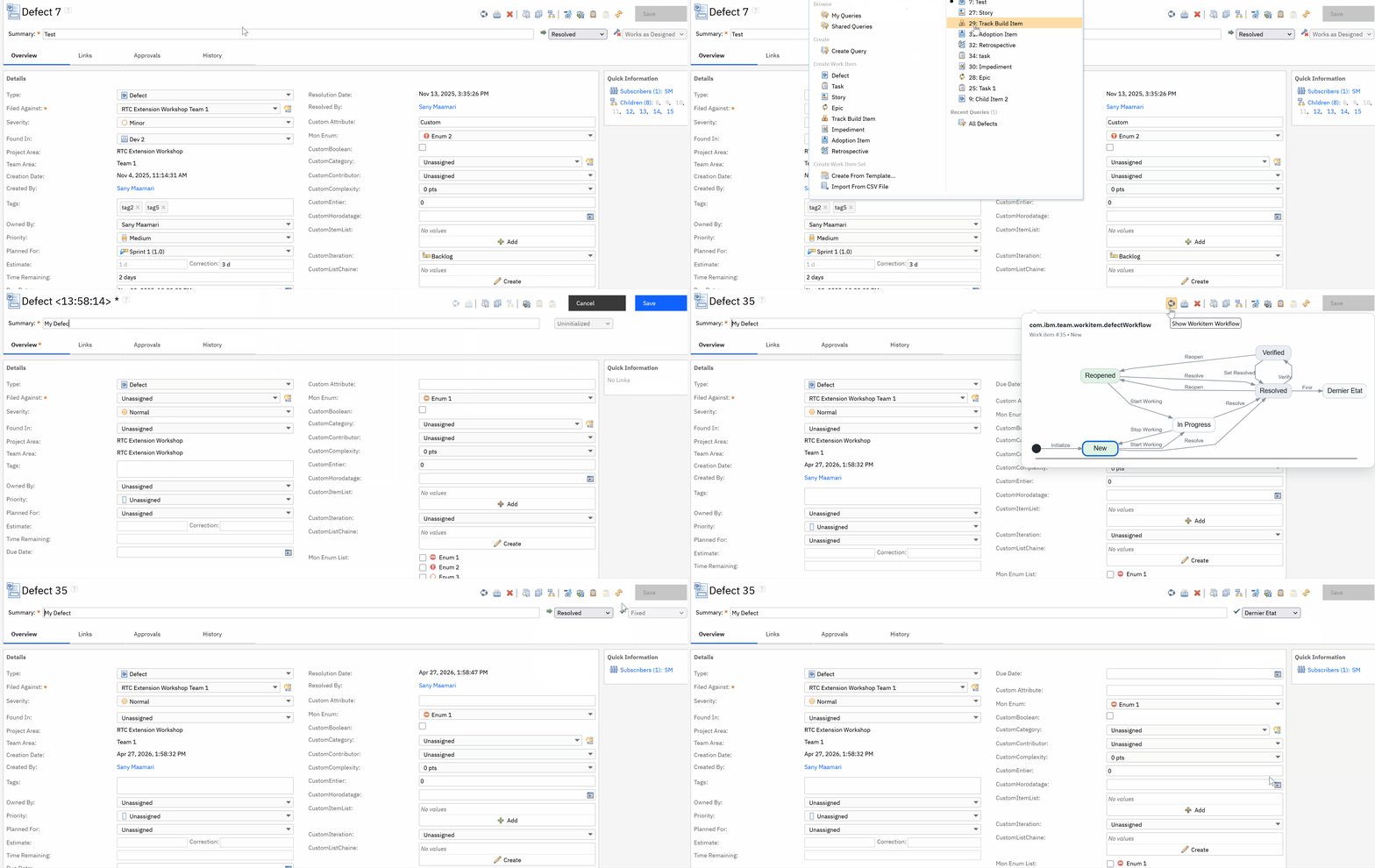
A new button appears in the toolbar of the work item editor. Its icon represents a stylised workflow diagram; its tooltip is “Show Workitem Workflow”. When the user hovers over the button, a bubble unfolds nearby and displays the workflow diagram associated with the type of the work item being edited. The bubble stays visible as long as the cursor is on the button or on the bubble itself, and closes automatically as soon as the user moves away. No navigation, no page reload.
The diagram is rendered as vector SVG: perfectly crisp at any browser zoom level or screen resolution. States are organised in columns by their EWM group (“Open”, “In Progress”, “Resolved / Closed”), with distinct colours per group. Transitions appear as labelled arrows showing the action name. While a work item is being created – before the first save, so without a real identifier yet – the button is greyed out and the bubble does not open.
Under the hood
The plugin is deployed on the Jazz server (ccm side) and is made of two independent halves.
On the server side, a Jazz-modelled REST service exposes the workflow of a work item via a dedicated URL. It leverages EWM internal services to read the workflow definition attached to the work item type, enumerate its states and transitions, and return everything as JSON.
On the client side, a Jazz extension adds the button to the toolbar and handles the hover behaviour, bubble creation, REST call and diagram rendering. The graphical rendering happens entirely in the browser, with no external network call. No additional component installation is required on the Jazz server.
Compatibility
The plugin targets IBM Engineering Workflow Management on recent Jazz platforms. It runs in every modern browser supported by EWM: Chrome, Edge, Firefox. No external resource is loaded at runtime.
Open source components
The plugin embeds third-party components whose licences are redistributable. A notice file and the full text of each licence are shipped with the plugin to comply with the legal obligations of every embedded component.