Parent / child hierarchies structure an essential part of the work in IBM Engineering Workflow Management (EWM, formerly Rational Team Concert): an Epic broken down into Stories, a Task that aggregates Sub-tasks, a Defect that groups its fixes. Yet the Children presentation shipped as standard is limited to a minimalist list of identifiers and labels, with no visibility into the business attributes that actually matter day to day.
The problem
The native EWM Children presentation only shows, for each child, an identifier and a summary. To find out the state, the owner, the planned iteration or the module of each child, the user has to open every work item one by one. To make bulk changes — for example moving ten children from a shared “To Plan” state to “Planned” after a scoping meeting — you have to reopen each editor and repeat the same action.
Adding a child to an existing parent is just as unnatural: it goes through links, or through creating a work item whose relationship you then set. In the end, the parent editor only serves to confirm that the children exist; it is not a control panel.
The solution
Syncheo built Child Items Presentation, a Jazz presentation that replaces the native version in any work item type editor. It keeps the place and the role of the official Children presentation, and adds three major capabilities: an enriched and configurable table view, inline editing of children, and adding / removing children directly from the parent.
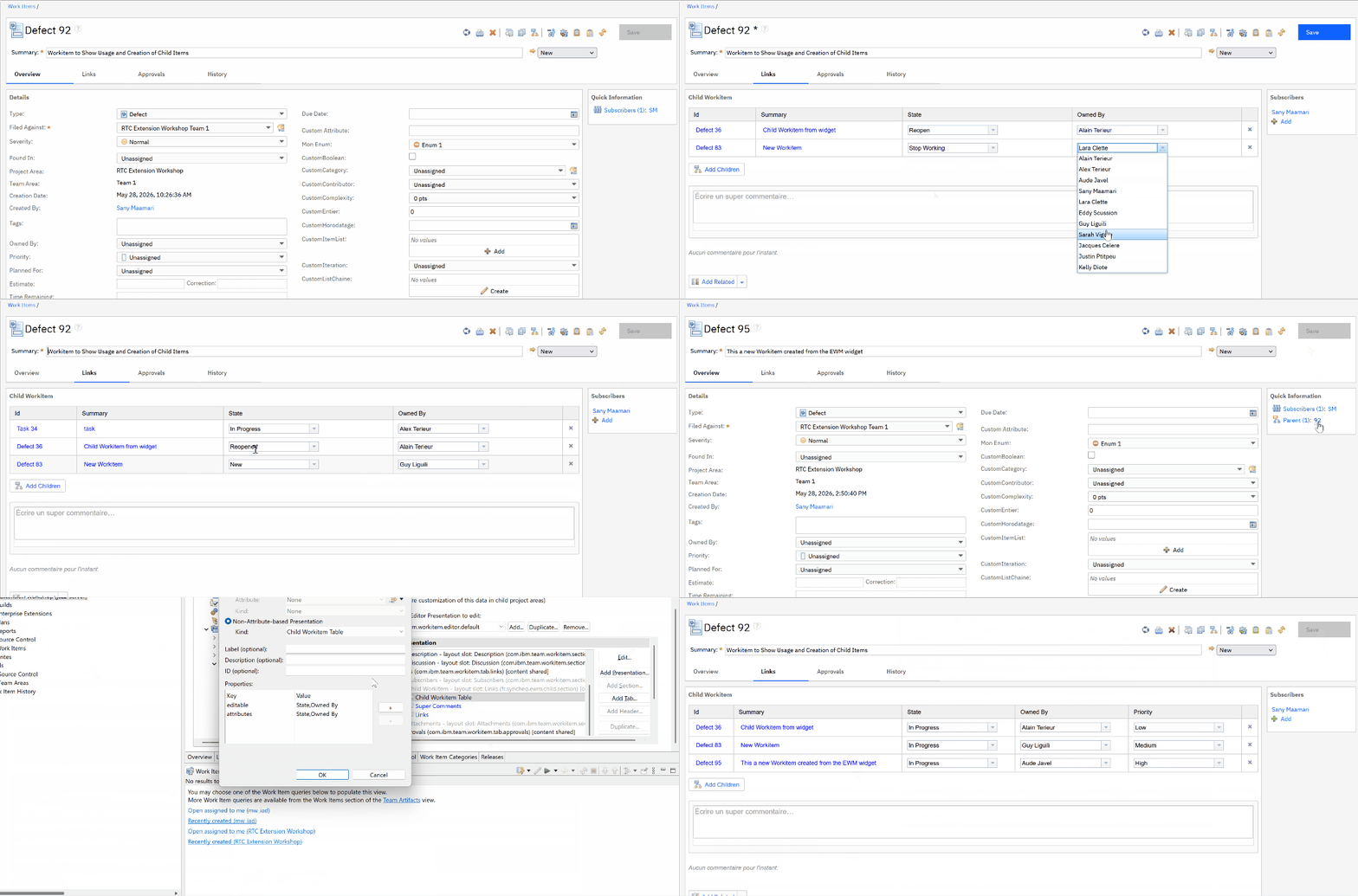
Bulk editing of several child work items from the parent editor, adding a new child through the official Jazz dialog, removing a link — all persisted in a single Save click.
Like any Jazz presentation, the widget is declared in the Process Configuration and integrates natively into the editor: no Save button of its own, no parallel persistence cycle. Changes are attached to the working copy of the current editor and persisted when the global Save button in the toolbar is clicked — exactly like every other field.
Features in detail
1. An enriched, configurable table of children
The table shows three columns by default: the clickable identifier of the work item, its type and its summary. To this is added the list of columns the project wants, declared in the Process Configuration: Owned By, Priority, Severity, State, Filed Against, Planned For, Due Date, Estimate, Time Spent, Tags, Description, Created By, Resolution… as well as all the project’s custom attributes, enumerations included.
Each team configures its own view: a delivery project will show Owner / State / Iteration, a maintenance project will show Severity / Filed Against / Resolution, with no redeployment of the plugin.
2. Inline editing
A second configuration property designates, among the displayed columns, which ones are editable directly in the table. When the user clicks an editable cell, the appropriate Jazz widget opens in place: an enumeration selector for State or Severity, a user picker for Owned By, a category or iteration picker for Filed Against and Planned For, a datepicker for Due Date, a duration editor for Estimate or Time Spent, a tag selector, and so on. The semantics are rigorously identical to those of the native Jazz editors: no new habit to learn.
Changes entered on several children trigger no immediate save. They accumulate in the editor’s working copy, and a single Save click persists them all in one server-side transaction. Cancel discards them all. No divergence is possible between the editor and the table.
3. Adding existing or new children
A discreet Add Children button at the bottom of the table opens the official Jazz Select Work Item dialog — the very one EWM uses to add a regular link. Every native feature is available: search by identifier or by text, filters, history of recent selections, multiple selection, and a New button to create a new work item on the fly.
An automatic exclusion list makes it impossible by design to re-select the parent itself or a child already attached: no duplicate, no self-reference. The selected work items then join the working copy through the same APIs as the native Jazz presentation — the same model consistency guarantees, the same behaviour on save.
4. Visual “pending Save” feedback
As soon as a child is added through the dialog, a row appears immediately in the table, styled in italics on a pale yellow background with an asterisk before the identifier. The user instantly sees that the operation has been taken into account, and that the row remains cancellable as long as the global Save has not been clicked. On Save, the table refreshes automatically and the row returns to its normal appearance.
This “pending” feedback covers a classic weakness of presentations that act on the working copy: without a visual signal, the user may doubt they clicked correctly and often ends up clicking again.
5. Removing a link
A small discreet cross at the end of each row — light grey by default, red on hover — removes the child reference from the working copy. As with adding, the removal marks the editor dirty but is only persisted on Save: a Cancel fully restores the initial list of children.
6. Jazz editor integration
The whole Save / Cancel / dirty state cycle is delegated to the host Jazz editor. The plugin observes the global Save button, groups the client-side changes into a single server call, then refreshes the table as soon as persistence is confirmed. The internal widgets follow the editor’s standard lifecycle, which guarantees the absence of memory leaks on close, even after several add / remove cycles.
Architecture and integration
Child Items Presentation is packaged as a standard Jazz plugin, deployed on the ccm server in the same way as an official presentation. It is developed entirely on the standard Jazz editor stack and systematically reuses the internal EWM components for the picker, adding, removing and cell editing. This reuse strategy — rather than re-implementation — guarantees perfect visual and functional compatibility with the rest of the editor, and drastically limits the maintenance debt when EWM versions are upgraded.
On the server side, retrieving the children uses the standard EWM query services, with a dynamic projection of the fields according to the widget configuration: only the attributes actually displayed are fetched. Changes are batched into a single call to spare the server load even when several dozen children are touched simultaneously.
Configuration
The widget is declared in the Process Configuration of any work item type editor, in place of — or in addition to — the native Children presentation. Two properties are enough to drive it:
attributes: the list of attributes to display as additional columns, separated by commas. All native attributes and all the project’s custom attributes are supported.editable: the list of attributes, among those displayed, that should be editable inline.
No redeployment is needed to adjust these properties: editing the Process Configuration is enough, and each work item type can have its own configuration.
Benefits
Child Items Presentation turns the parent work item editor into a real control panel for its children. Teams gain a consolidated view of their hierarchies, can bulk-edit dozens of children without opening each editor, add and remove links directly from the parent, and keep the Cancel safety net at all times.
Because it fits strictly within EWM’s native Save / Cancel cycle and relies on the official internal components, the plugin introduces no new habit to learn for the user, no risk of desynchronisation with the Jazz data model, and no redeployment to adapt the display to a new project or a new work item type.