IBM Engineering Workflow Management (EWM / RTC) keeps the full history of a work item, but for tickets that accumulate many changes it becomes very hard to follow the status over time. Status History Presentation is an open source widget from the Jazz community that answers exactly this need: Syncheo picked it up on GitHub and repackaged it so it installs simply on the latest IBM Jazz versions. It displays, right inside the work item editor, a timeline of status changes.
The problem
A work item’s native history mixes every modified attribute — summary, owner, estimate, comments — across every save. To answer a question as simple as “when did this ticket move to In Progress, and how long did it stay In Review?”, you have to scroll through dozens of rows and mentally reconstruct the timeline. On a work item that lives for several months, the exercise is tedious and error-prone.
One timeline, two ways to read it
The widget keeps only status changes: each stage in the ticket’s life becomes a node on a time axis, from creation up to the current state. You can see at a glance which states the work item went through, in what order, and when. Everything is rendered as SVG, crisp at any zoom level. Two display modes are available, depending on what you want to emphasize.
USER mode — contributors in the spotlight
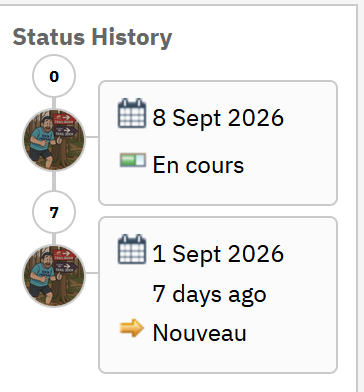
timeline=USER: each contributor's avatar on the timeline.In USER mode (timeline=USER), the default, each node on the timeline shows the profile picture of the person who made the change. The card next to it recalls the date and the status reached — In Progress, New, and so on. It is the ideal reading to see, at a glance, who moved the ticket forward and when, without opening the full history.
STATUS mode — transitions in the spotlight
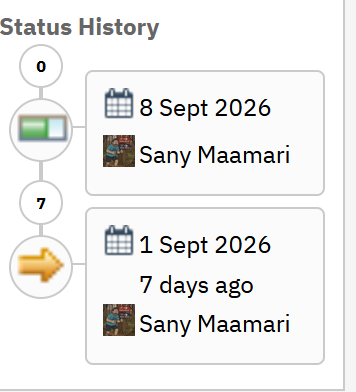
timeline=STATUS: each status icon on the timeline.In STATUS mode (timeline=STATUS), the status icons take over the timeline while the card highlights who made the change. The focus shifts to the transitions themselves: you follow the ticket’s path through its successive states, with the information about people moving to the background.
Detailed history on hover
The enableDetailedHistory option controls how much detail appears when hovering a node on the timeline.
Detailed view (enableDetailedHistory = true)
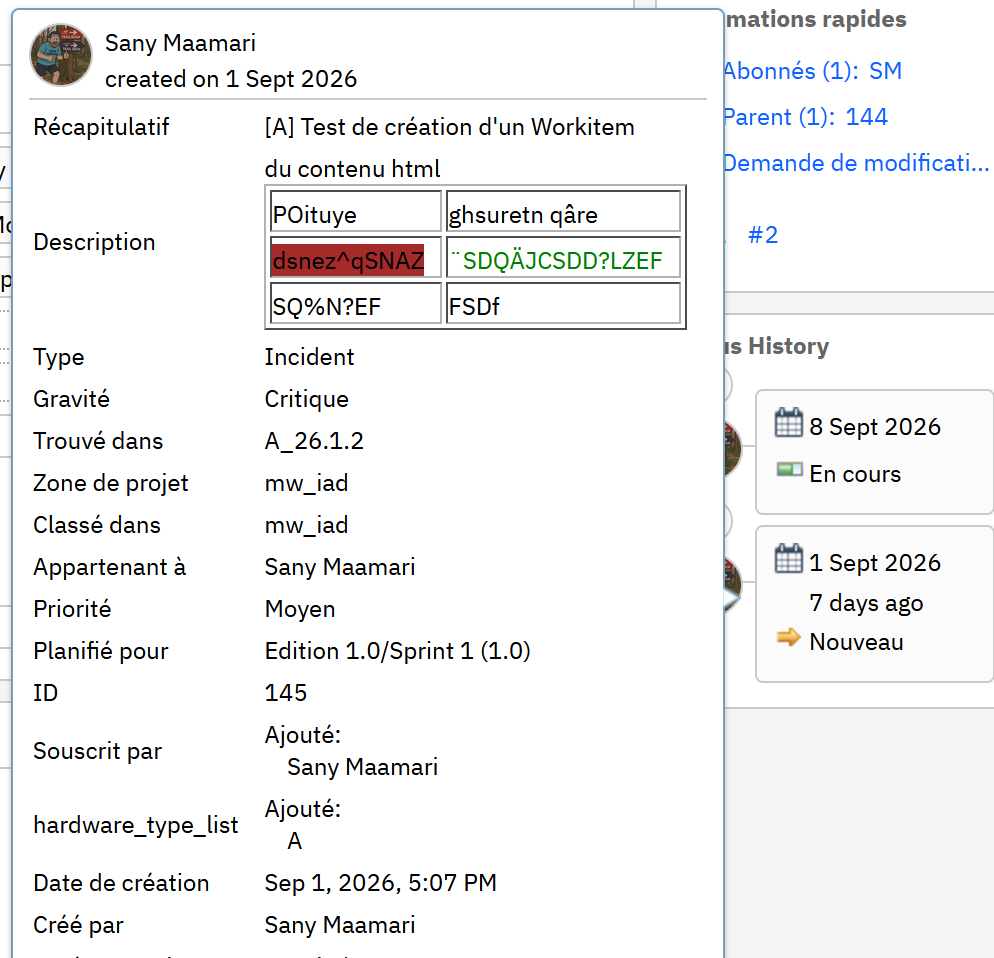
Enabled, it unfolds on hover a full tooltip showing all the work item’s attributes as they were at that precise moment in its history: summary, description, type, severity, priority, planning, ID, subscribers… A complete snapshot without leaving the editor, useful to understand the exact context of a status change.
Compact view (enableDetailedHistory = false)
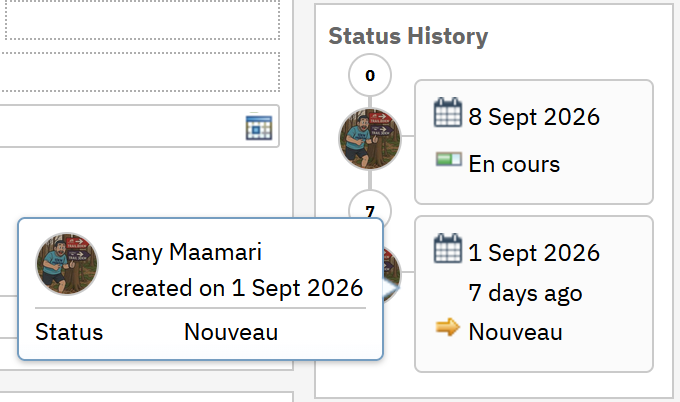
Disabled, the hover is limited to a compact tooltip: author, date and the status reached. It is the right trade-off when readability and performance come first, especially on work items with a very rich history.
Further convenience options round it out, such as larger icons or a deadline indicator (soonDays) that flags upcoming due dates with a colour code. Technically, it is a Non-Attribute-based Presentation: a section you add to the work item editor configuration from the project area administration (Work Items → Editor Presentations), with no server-side development required.
Installation streamlined by Syncheo
The original project was initially verified from RTC 6.0.3 onward. Syncheo repackaged it as a ready-to-deploy update-site aligned with the latest IBM Jazz platform versions: no need to rebuild or adapt it to recent versions — installation is direct.
Origin and licence
Status History Presentation is an open source project from the jazz-community, released under the MIT License (© Siemens AG); it embeds the calendar icon from Font Awesome (CC BY 4.0). Syncheo’s work is the repackaging and adaptation to the latest Jazz versions, in compliance with that licence.
Compatibility
The widget targets IBM Engineering Workflow Management (EWM / RTC) on recent Jazz platforms. It runs in every modern browser supported by EWM: Chrome, Edge, Firefox.
The original repository
The original open source project is available on GitHub: jazz-community/rtc-statushistory-presentation.